

DriverMax 18 for Windows
How to register DriverMax
Where your registration code comes from, where to type it, how a licence is activated on a PC — and how to move it to another PC or to a fresh install of Windows.
The short version · What a licence changes · Your registration code · Activating another PC · Machine activation · Reinstalling Windows · Do I need an account? · Messages you might see
The short version
If you bought DriverMax on this PC, it is already registered. The purchase activates the computer it was made on, so there is nothing to type and nothing to click. Your code still arrives by email — it is for your other computers, and for the day you reinstall Windows.
To register a second computer, open DriverMax there, click the account button in the title bar, and either sign in with your account or enter your registration code. Either one activates that PC.
Your licence is kept with your account rather than welded to one machine, which is what makes it possible to move it. A licence covers a set number of computers; each computer that uses it takes one place, and you can free a place again at any time from Settings.
What a licence changes
DriverMax scans your computer, lists the drivers that have a newer version, and downloads them, without an account and without registering anything. What the free version limits is how many drivers you may install: two a day and ten a month. When the day's two are used, DriverMax says so rather than failing quietly:
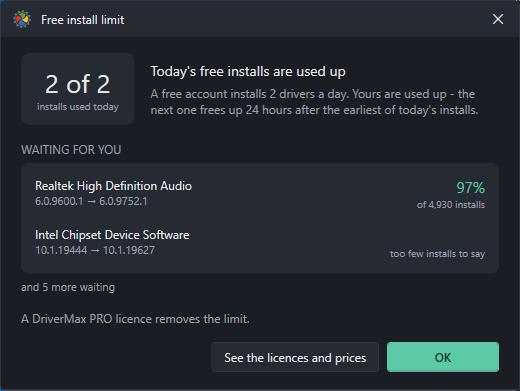
A PRO licence removes that limit on the computer it is activated on. Nothing else about the app changes: the same scan, the same driver catalogue, the same restore point before every install.
Only successful installs count against the free limit. A download that you cancel, and a driver where Windows decided to keep the one it already had, cost you nothing.
Your registration code
Your code is emailed to the address on the order as soon as the payment clears. It looks like DMXN-XXXX-XXXX-XXXX.
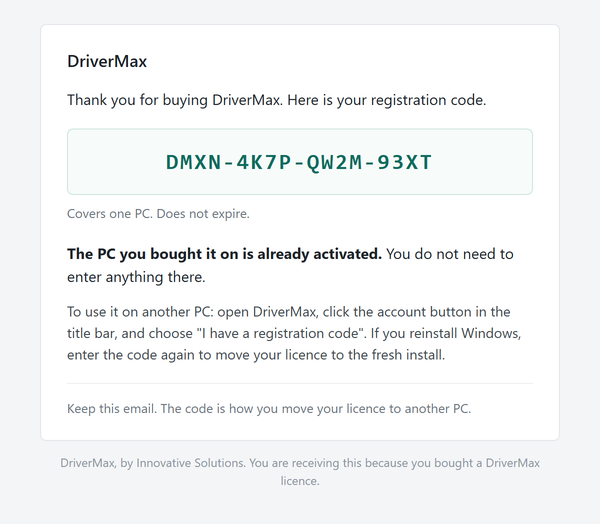
Codes are also handed out on their own — in a magazine, on a card, in a promotion. Those work in exactly the same way; the only difference is that there is no order behind them, so nothing has been activated for you in advance and no address is suggested when you create your account.
A code from DriverMax 17 looks different — DMX-08F-X52-2274 rather than DMXN-… — and it is still accepted, as long as it was bought and never used. If it has already been redeemed, the licence is on your DriverMax 17 account: sign in with that same email and password instead of entering the code. Free and promotional DriverMax 17 batches cannot be carried across.
If you do not have a licence yet, the prices are inside the app: click Get PRO in the title bar, or open Settings and press See the licences and prices. One payment, no account needed to buy, and the computer you buy on is activated straight away.
Activating another PC, step by step
Do this on the computer you want to register — not on the one you bought on, which is already done.
Open DriverMax and click the account button
It is the person icon in the title bar, at the top right of the window.

Choose “I have a registration code”
The link is under the password box.
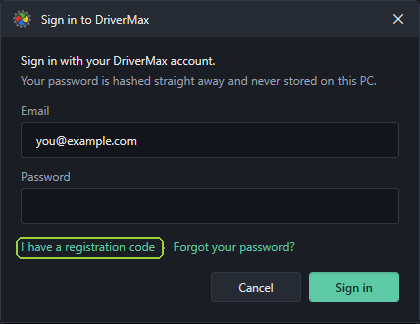
Already have an account and remember the password? You do not need the code at all. Sign in on this window and, if your licence has a free place, this computer takes it there and then — DriverMax answers with “This PC is now using your licence. You can release it in Settings at any time.”
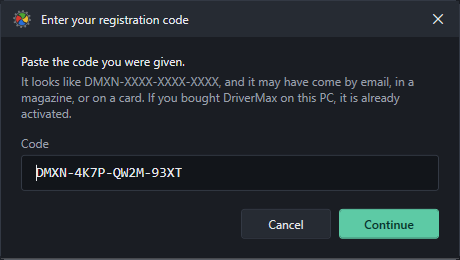
Paste the code and press Continue
Capitals, hyphens and spacing do not matter; paste it however it arrived. DriverMax checks what the code is before it spends anything, so a code you type by mistake is not consumed.
Put the licence on an account
If you are already signed in on this PC, this step does not appear at all and the licence goes onto the account you are signed in with.
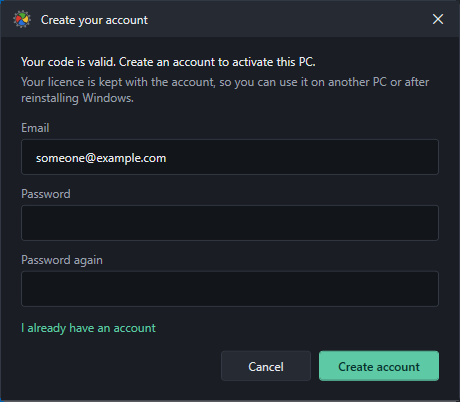
Otherwise DriverMax offers to create one, with the address the code was sold to already filled in:
If you already have an account, click I already have an account and the same window signs you in instead:
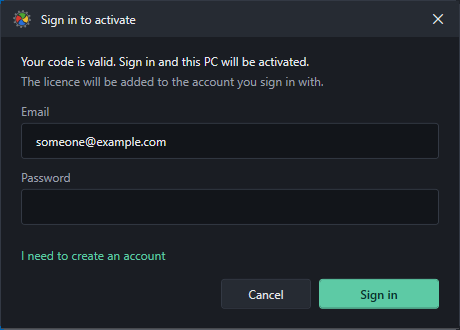
Backing out here costs nothing. DriverMax says “No account, so the code was not used. It is still valid.” — the code is only spent once there is an account to give the licence to.
That is it
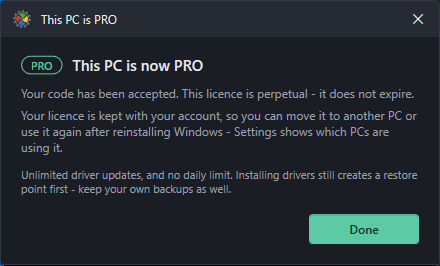
Machine activation: how a licence is tied to a computer
A licence covers a number of computers — one, unless you bought more. Each computer that uses it takes one place, and the place is held by the computer, not by a person and not by a Windows user account. DriverMax recognises a machine by an identifier it derives from that machine's own hardware, and shows the last few characters of it so you can tell two PCs apart.
Everything about that is visible in Settings, under the line that says what this PC has:
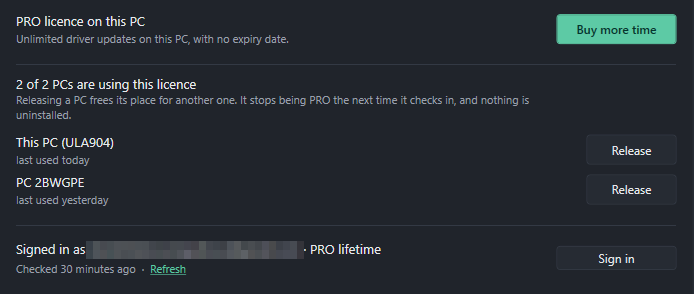
- Release frees that computer's place for another one. Nothing is uninstalled and no driver is removed — the released PC simply stops being PRO the next time it checks in, and goes back to the free two installs a day.
- There is no Release button beside the PC you are sitting at. Releasing the computer you are using is not something the panel will do by accident.
- The panel is hidden when there is nothing to manage: no licence, or not signed in.
Reinstalling Windows, or moving to a new computer
A fresh install of Windows looks like a different computer, so the place your old install was holding is still held by a machine that no longer exists.
The tidy way: open Settings on the old PC and press Release before you wipe it. Then enter your code, or sign in, on the new install.
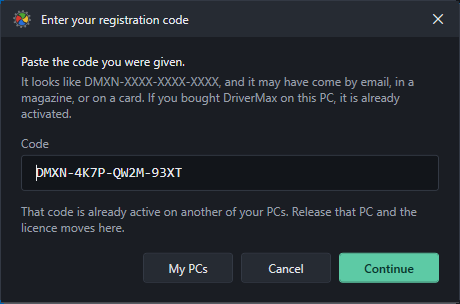
If you forgot — and most people do — enter your code on the new install anyway. DriverMax will tell you the code is on another of your own PCs, and offer the panel that frees it:
And if you can no longer reach the old machine at all, it sorts itself out. A place that has not been used for thirty days is released automatically, the next time another computer asks for it. You do not have to write in, and there is nothing to undo afterwards.
Do I need an account?
Not to use DriverMax. Downloading it, scanning, reading the results and installing drivers under the free limit all work with no account at all, and always have.
An account earns its keep once you have a licence, and it does two things:
- it holds the licence, so the licence is not lost with the computer it was first used on;
- it lists the computers using that licence, so you can move it.
That is why DriverMax only asks you to make one at the moment you activate something — an account with no licence on it has nothing to show you.
Passwords. An account created in DriverMax can be reset from the app: click the account button, then Forgot your password?. An account that came from DriverMax 17 has its password managed by DriverMax 17, and the app will say so rather than sending an email that never arrives. Once it is reset there, signing in here works with the new password.
Messages you might see
DriverMax says which situation a code is in rather than refusing it flatly. These are the sentences worth recognising.
| What DriverMax says | What it means, and what to do |
|---|---|
| “This PC is already activated with that code.” | Nothing is wrong and nothing was spent. This computer already has the licence. |
| “That code is already active on another of your PCs. Release that PC and the licence moves here.” | The place is held by another of your own computers — often the same one before a reinstall. Press My PCs and release it, then enter the code again. |
| “That code is already used by the account d***@example.com. Sign in with that account to use it on this PC.” | The licence belongs to an account, and the code alone is not proof of who you are. Sign in with that account and the computer takes a free place automatically. |
| “That licence covers one PC and it is already in use. Release the other PC first.” | Every place on the licence is taken. Free one in Settings on any of those computers, or ask us for more places from inside the app. |
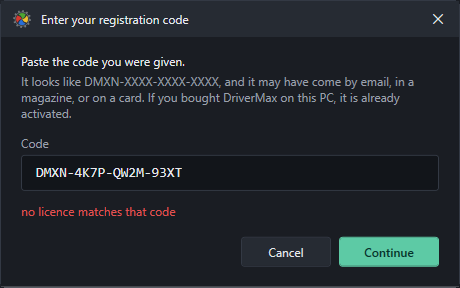
| “no licence matches that code” | The code is not one of ours, or it was mistyped. Check it against the purchase email — the letter O and the digit 0 are the usual culprits. |
| “That DriverMax 17 code has already been used…” | The licence is already on your DriverMax 17 account. Use Sign in with that email and password instead of the code. |
| “That is not a DriverMax registration code. Ours look like DMXN-XXXX-XXXX-XXXX.” | What was pasted is not a code at all — usually an order number or a receipt reference from the payment page. |
Still stuck?
Write to us from inside DriverMax, not from this website. Open Settings, find Help and contact, and press Contact us.
That form is the one that can actually be answered. It sends the application log and your Windows details along with your message — which is exactly what a question about a code or an activation needs — and you can see and untick everything before it goes. The reply comes back inside DriverMax, under Settings, and by email as well if you choose to give an address.
Say what you were doing and what DriverMax told you. If it is about a code, quote the version line from Settings and the first four characters of the code — never the whole of it.